Tuesday, August 30, 2011

Important Points Before Writing The Scenario

Suit yourself while writing
Beraudiovisual’s friends, are you learn to write scenario this time? If yes, then there are some things you must know before writting scenarios. The scenario is the most important element in a film production (television) because it is a necessary element  earliest as a draft to make a film.
 
Basic story
Before creating the scenario, we need to know what we write. You do not immediately rush, the first scene. The first thing we need is the basic story (basic story), a statement of who, when, why, where and how the things we want to create a scenario. Basic story, we can also express as a summary of the general or global view.

Character
In a scenario that we create, numbers will appear. We need to recognize and deeper. Worth a lot. We know how to figure the dialogue, thinking and acting. We will know how the hero would solve the problem. Also, conflict as between one character with another character.
In this phase, the player search (casting), explanations of characters is also very helpful to have created the appropriate player to play the character. In addition to the player himself will be easier to understand the character he was playing.
For the development of character, we can do this by providing data on: the full name and calls, religion, age, familial relationships and friendships, favorite (science, movies, music, sports, reading, eating), physical characteristics, intelligence, fashion style, manner of speaking, properties, houses and others.

Set / Location
To create a scene, we must determine the sets and locations (where the scene takes place) in advance. This will allow us to determine the scene. What do you do, the position where, from where, where watched, or to see in which direction.
The scene takes place, which could be built on the studio sets, such as living in the house like a porch, a living room, living room, bedroom, kitchen, or we use a part of building a proper home. The definition is not always to be home, but also the road or elsewhere.
Explanation of this sentence, but are useful for us in the scenarios also useful as a guide for the set builder sets in the studio or production unit for the building to building, which will serve as a set to meet the requirements of the scenario to find suit.

Synopsis
Before writing the script, we must ensure that the story creates a script. Not invent a story if the scenario is created. The history we can give a succinct but contain elements of character, time and place of incident, problem, problem and solution development. This is a summary.

Chronology Stories (Story Line)
If the summary, which we have made, will be developed into a scenario for a TV show with a duration of 24 minutes, we describe it again in a summary of the plot (plot) in four rounds (ACT) with a calculation interrupted the radio commercials will be as much as three times divided.
The purpose of the act is to developmental disorders and dramatic elements that can create are completed in one phase in each fragment sequence that ads less intrusive and creates a scene at the end that makes the audience want to know the rest.

hopefully with a few points above, it can help Beraudiovisual’s friends to be able to write a better scenario. Do not forget, Suit yourself while writing.

Read More >>

Sunday, August 28, 2011

Canon XF300 and XF305: Professional Camcorder for Professional Production.

Hello beraudiovisual's friends. It is not hot news, but it is important! Canon introduces two new professional camcorder, XF 300 XF 305 is a gift. Two of the latest innovations based camcorder professional video and film production for the article will be hired. Newcomers to the rank of this camcorder compact flash card (CF) can be written directly to the roll-out is a professional camcorder.

Combining video, audio and metadata into a single file, Canon 305 XF 300 and XF using MXF (Material Exchange Format), which is an open format. This format is useful to maximize compatibility with existing video non-linear editing system. Video recording format MPEG-2 Codec Canon also produces high-quality digital video with bit rates up to 50 Mbps. Specifically for Canon XF 305 is also equipped with features Genlock output terminal, Time Code and HD / SD-SDI terminal, which serves to produce a variety of video cameras and 3D films.

Canon Camcorder 305 XF 300 and XF uses MPEG-2 Full HD (4:02:02) file-based recording codec to produce a professional video with crisp detail at a resolution of 1920 x 1080p (Full HD). With three Canon original CMOS sensor ditanamkannya, both camcorders are claimed to produce digital video with natural color gradation.

Canon Camcorder XF 305 XF 300 and lens 4.1 mm - 73.8 mm lens equivalent to 29.3 mm - 527.4 mm in 35mm format camera. This lens has a 18x zoom ratio so that comes with Manual Focus mode can be set easily by the user. Canon also uses IP-UD Lens (Dispersion-High Index, Ultra Low) and aspherical which serves to reduce noise to provide a sharp color and compact size. Lens also is integrated with new forms SuperRange Optical Image Stabilizer system (OIS) feature Powered Dynamic mode and increase the performance of the sensor to produce a focus more quickly.
Canon-performance XF 305 XF 300 and feel much stronger because it comes with swappable dual card slots and UDMA CF card which allows file transfer to PC / laptop with you. To support the use of XF Codec Canon, Canon worked with major software developers like Adobe, Apple, fans and Grass Valley. This is to ensure unity between the camcorder with the software programs which are often used in film production, video production and broadcasting industry.


Canon XF300 and XF305

Another special two Digic III processor, professional camcorders use the DV required to capture the natural colors accurately. Innovative strength DIGIC DV III processor Face Detection technology, features, where users can specify the primary interface in the video group and automatically focus on the main page, even if the subject is moving.

Both camcorders are also designed for maximum comfort and flexibility. Design Canon 305 XF 300 and XF allows users to take video images without holding strong in the arm fatigue. Both are also equipped with LCD 4-inch 1.23 million dot resolution monitor that can rotate and can be placed anywhere, either right or left side of the body to further facilitate the camcorder also see the video taken of the position to make a video most difficult.
Visual Advantage XF 305 XF Canon camcorders. 300 and sound perfected by the flexibility offered. Features built in microphone and two XLR inputs it has external audio sources that can catch, so the resulting sound quality is clear and sharp sound. Canon XF XF 300 and 305 also supports 16-bit PCM audio at 48 kHz with a level of audio adjustments automatically and manually.
LCD monitors are both brand new camcorder also provides a display Built-in Memory waveform and Vectorscope to help achieve the level of exposure and color accuracy when shooting video. Not only that, the LCD monitor can also show the focus and zoom the image, allowing the user to confirm the object in HD format. Equipped with an electronic viewfinder 1.55-megapixel camera, professional video camera provides the highest resolution in its class for critical focus and 100 percent coverage in appearance.
Present through PT Datascrip as sole Canon products distributor in, Canon XF 300 priced at IDR 79.65 million. While Canon 305 XF marketed at a price of IDR 90.81 million.


Are you ready to be a Pro?


How beraudiovisual's friends? interested to use it?


Read More >>

Simple Helicam, Combine The "Helicopter Remote Control" and Canon DSLR camera.

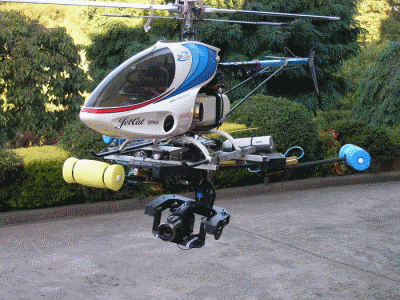
Hello beraudiovisual's friends. For you a crew of film production or television production, must be familiar with helicam. Helicam is a unique tool that can photograph or record images from a height, because the tool can fly. The principle of this tool is simple, and can even say there's nothing special, just like a regular camera placed on top of a toy helicopter. then we steer it. But the cameras used in Helicam this is not a regular camera, but Canon 7D DSLR cameras, in addition to the tool is also equipped with GPS (Global Position System) which allows us to continue to monitor the existence of this instrument when flying, and with a 5.8 GHz video monitor system , allows you to see every moment that was caught on camera this tool.
The Real Pro Helicam

The Real Pro Helicam


In a process to get the perfect shot, Eric Austin, a videographer who resides in Texas, found a neat way to combine the "helicopter remote control" and Canon DSLR cameras so he could air the video shoot with ease and get the kind of record that should be difficult to obtain. 

"I took a helicopter hobbyshop and modified to be fitted with a camera, so I can get a low altitude, the air close and tight shots," said Austin Wired.com.

An amateur videographer who became a pro, Austin is interested in photography remote control just four months ago.

 "As I do more photos and video, I realized I could develop a niche where I can use technological advances to provide the type of photos that most people can not get it easily," he said. 

Austin is one of the hobby photographer who finds a way to use a remote control toy airplanes and helicopters to get a more interesting camera angles. Wired magazine Editor-in-chief Chris Anderson in a site called DIY Drones where the user has found a way to use unmanned aerial vehicles to conduct aerial photographs. Last year, New York City photographer Anthony Jacobs showed a helicam built using German helicopter rig named MikroKopter. Jacobs uses helicam rig to shoot the video neighborhooods in the city. 

Austin, who has a website devoted to his RC helicopter videography, Saying he wanted to do something similar and offer quality HD video and photos. That is why, he said, he decided to create a rig that will be reliable and produce a type of recording that can be used by professionals. And as this clip shows, the video can be interesting. 

Aerial video with the Canon 5D, 7D AUSTIN helivideo.com from Eric on Vimeo.

Footage shot so far, Austin has helped to TV shows including the History Channel series of slices.
Austin started with a remote control helicopter called Align T-REX 700 and modified to carry a particular frame of the camera mount. He put tweaked landing gear for helicopters, covered with bright pink foam from "Noodles" is commonly used in swimming pools. 

"The color stands out when I fly outdoors helicopter," said Austin. "And if I hit the water, the equipment all my life will not go down. It will be destroyed, but at least I'll get my teeth back" Austin said.

He adjusts the camera settings when it's on the ground and pressing the Record button just before takeoff. For still images, Austin said he uses an external timer that activates the shutter every few seconds.

To create a video of the flying rig, Austin said he spent hours in online discussion forums at Helifreak.com.

"I do not know anyone to talk to," he said. "And then realized the only place to go is online where people discuss this."
Eric's Helicam

Eric's Helicam


One of the more challenging task of Austin has done with his helicam ie flying over a cliff about 25 meters high with a river below. And he did not destroy the helicopter.

"The likelihood that accidents will happen there, but so far, I have been careful," he said.
To download video, Austin has established a 5.8-GHz downlink the video feed using a wireless transmitter on-board.

All this does not come cheap. Austin estimates the whole rig cost him about $ 15,000. But for those at home, who want to do something similar, he says there are cheaper alternatives.
The results

The results of image shot from helicam.


"I go for the best and most expensive components because I do not want to risk it fails the air," he said. "But you can get an RC helicopter for about $ 400 and put the camera point-and-shoot on it."
Read More >>

Author Profile

My photo
I am a film editor who currently lectures at one private university in Yogyakarta. incorporated in AVIKOM (Audio-Visual Communication)