|
| New Revolution for Film Maker |
Since Nikon introduced D90 in August 2008 as the first DSLR camera that shoots video High Definition (HD), a silent revolution taking place in the production of media. At a fraction of the budget creative camera people are capable of producing high-quality recording is outstanding-all with the build-out stills camera for a total investment of $ 7,500. This is good news for a film maker!
The Visual beauty of the depth of field
A shallow DoF allows you to focus on the subject, leaving the rest of the focus. This isolates the subject from the background and allows you as a movie maker control where you want the audience to put their attention. If all sharp, the Viewer could easily be led astray by details not relevant to the story. And it just seems amazing.
Working with a shallow DoF is not easy: topics that move implies that to keep shortly taken you to the focus ring (also known as focus always) to keep.
Top 10 DSLR disadvantages & how to overcome them
If there is not bad at all when it comes to this way of production of the video? You betcha! However, there are also a growing number of ways of their solution. Let's take a look:
Audio
Second camera DSLR suck in the recordings. Built-in mic is miserable and the camera does not feature professional XLR input. In addition, should determine the automatic gain control (AGC) in the next firmware upgrade and allows at least on the screen for manual control of the levels of dB. In addition, there is no way you can monitor the sound through headphones, the LCD is turned off when you set a limit on the Canon 5 D head AV (7 D has different plug). But then again, audio recording has never been the subject of the project. Enter magnification. H4N handheld recorder provides a DSLR-shooter simple device which, supplanting the sound recording, allowing for up to four independent channels at the same time (1 x front and 2 crossing stereo XLR input external mics). Synchronization takes place on the positions of the signal reference, such as clap hands or Clapper boards at the front of the camera. You should therefore key to keep the audio recording on a DSLR for a sound reference. And if you are editing Final Cut or Sony Vegas, enter PluralEyes (too bad I'm on Adobe Premiere Pro). If you want to manually control the audio on the camera itself, Magic Lantern firmware hack may be an option.
Stability
First of all, a stills camera is built to maintain constant for about 1/60 of a second, not to register or for more than 24 frames per second (i.e. shooting movies). Enter The Zacuto. This Chicago-based company, founded by people with a history in camera work, one after the other cranks innovation that helps DSLR shooters to stabilize their photos. Also: enter CineKinetic (or Visual departures). Using Mini-or BabySaddle (or SteadyBag much cheaper) allows you to create stable pictures even while moving objects such as a car, train, tram, bike plan or air. For those who like to go: enter the Glidecam. And for those who are ready for more pictures of dolly: enter the GlideTrack and WallyDolly. However, be careful with the movement too quickly as chips CMOS sensor offer some jello effect (see below).
Light
DSLR cameras beat any camcorder, when it comes to low-light situations, fair and square. Nevertheless, and this applies to any type of camera with sufficient and correct amount of light is critical to the final result. Various vendors have entered this arena, offering useful equipment at interesting prices. Enter Dedo Ledzilla and Litepanel micro.
Display
In order to be able to judge sharpness, you need appropriate scenes. Because it is blocking the camera lens on a DSLR when entering live mode (i.e. required when shooting video), you need to see the details without scattering light from falling on the LCD screen. Enter (again) with the Zacuto Z Finder. Looking through the lens is not an option due to the position of the camera? There are alternatives such as the original 720 p LCD smalhed.
Filters
If you want to go to the shallow depth of field, you must open the iris on the camera. The stills camera this can easily lead to the exposure. Most photographers will be tempted to start to change the ISO or exposure time setting. The shutter must be stored in twice the frame rate, you shoot (e.g. 30 p – > shutter at 1/60, 24/25 p – > shutter at 1/50, 1/48 is not supported) to adhere to rules 180 degrees in film shutter. The best way to reduce incoming light: enter the neutral density filters from Singh-Ray (actually two circular polarization filters, merged into one). It gradually reduces the incoming light from 2 until 8 stops.
AVCHD Editing
DSLR cameras record in AVCHD format using the codec h. 264. Cineform Neoscene, creates intermediate format using wavelets to decipher those much needed intraframe image and reduces your CPU from having their calculation.
Rolling shutter or Jello effect
In fact, this is a problem on most DSLR cameras. The effect occurs best when you pivot the camera quickly or enter part of fast moving objects. Solution: more slowly and in post speed not whip Pan – record. If this is not an option (such as you have people or moving objects in frame), exists to fix an after effects/Nuke plugin called RollingShutter.
Compression against color
Although DSLR HD video sensor capable of recording full frames (35 mm) is used a lot of compression recording compact flash card. This means that the component video (4: 2: 2 or 4: 4: 4) are not normally available on the classification of the color and consist of a signal. This makes it difficult for color grading, chroma keying, Matte painting or Rotoscoping, enter more pain. However, the main classification of post-production color: enter the RedGiantSoftware. Using Magic Bullet looks makes it fast and efficient (or slow and comprehensively) of their shots. Philip Bloom explains. If you still want more: Cineform will help you through the process again to create a 4: 2: 2 intermediary file format. Not ideal but workable.
Recording the border
Limited to save on most DSLRs on the clock to five minutes for a single navigation. For what value from what I hear, this is something with the import restrictions. If they go beyond These products are not regarded as a stills camera, and a different tax categories. Another story tells that there is something to a 4 GB file size limit (partial support for 720 p will fix that). How do it in a comment there if you are recording live events, capturing most often is shorter than that of the most important things for the sake of coherence is to record sound correctly — you can fill in a gap in the post later with special ingredients, you kick before or after an event (or stills from a slide.) If you are recording a live presentation.
24/25 p and 30 p
To achieve this look cinema or film, recording video the way film is traditionally. The meaning of p 24 or full 24 frames per second. The planet is NTSC framerate 29, 97, while 25 in PAL markets. Snapshot initially thought players, you can change the world by going ar 30 (dadon, drop-frame) as a new standard for video. Erroneous. Because there are still way more TV cameras on the planet, this has been shown to be losing the battle from the outset. When matching to 30 pp 24 actually shooting slightly slow, or ask your output or combine frames. This gives a slightly notable visual effect, audio synchronization problems, as well as easily. Canon may be wrong, and start to correct it. D Canon 7 now supports different frame rates (24/25/50 in PAL)-24 30 60 in NTSC, while fixed long d 5 Mark II (hope?) is due for release in January 2010. Haya Canon, makes us more than happy!
The Conclusion of All
should go to DSLR or stay with (semi-) professional video device? My answer is that everything depends on what you're doing. The key is the comparison of time compared to the budget. Me, that work with DSLRs, as digital cinema, is probably better suited for those who have time to set things right, if only assured, are met, the disadvantages (read: check the subject of the audio and record sufficient background or set up noise!). Without stabilization device and manual audio recording may not be the best DSLR camera and when Obama wants to meet in the press for a quick interview. You may want to shoulder-mounted ENG camera to it. A typical price points, however, are not within the budget of most people. So, if no time is of the essence, with improved DSLRs is very, very attractive alternative.
Going to make you fly on DSLRs and filmmaker? No, because it takes a lot of practice, knowledge, talent and learning. Since recently WIRED correctly, "it may be expensive DSLRs, but talent is priceless". However, with at least the possibility of taking beautiful pictures, and more people started shooting (and actively promotes the Canon), high-quality content (even for 1080p) Web site that looks like it was created by using professional cinema equipment in explosive growth expected. And that's exactly what I business.
Beraudiovisual's friends, what about you?

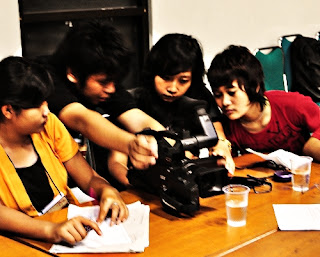 Beraudiovisual's friends, here is a listing of some of the most essential factors to keep in mind when making a short film. Following these recommendations can help you prevent the more common problems. While these are just recommendations, they may almost certainly increase each your film as well as your filmmaking experience.